Guides
Trin for trin-vejledninger til opsætning og brug af systemet.
Guides - Substitution codes
-
Guides
- General
- Customers
- Settings
- Substitution codes
- Substitution codes: Your company
- Substitution codes: Customer
- Substitution codes: Customer group
- Substitution codes: Booking
- Substitution codes: Vouchers
- Substitution codes: Marketing
- Substitution codes: Order
- Substitution codes: Classes
- Substitution codes: cash register
- Substitution codes: Invoice
- Substitution codes: Forms
- Substitution codes: Calendar 2.2
- Substitution codes: Icons
- iCal Feature
- Tips
- Booking
- Events
- Cash Register Add-On
- Gift Voucher Add-On
- Marketing Add-On
- Record Add-On
- Form Add-On
- Documents
- Online Payment Add-On
- SMS Add-On
- For developers
- Integrations
- General
Substitution codes
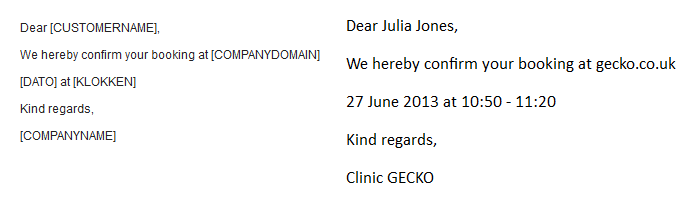
When you send e-mails and SMSes via the booking system, you can use substitution codes. Substitution codes are codes you write in the text, e.g. [CUSTOMERNAME], that are replaced by something else in the e-mail/SMS the customer receives - in this case the name of the customer. In the screenshot below, you can see an example of how substitution codes work. The text to the left is the text written under 'Texts' whereas the text to the right is the e-mail the customer receives.
Substitution codes can be used to insert information about the following:
|