Guides
Trin for trin-vejledninger til opsætning og brug af systemet.
Guides - Activate \'Print always\' in Mozilla Firefox
-
Guides
- General
- Booking
- Event
- Cash Register Add-On
- Gift Voucher Add-On
- Marketing Add-On
- Record Add-On
- Form Add-On
- Documents
- Online Payment Add-On
- SMS Add-On
- Integrations
- For developers
Activate \'Print always\' in Mozilla Firefox
If you wish that your receipts will be printed immediately after a sale, you can make Firefox skip the 'Print box' and print directly. In order to activate this feature, you first have to set up your receipt printer so that it works correctly. Then, you need to follow a few steps before the feature is activated. |
 |
Please note! This feature works with both Mac and PC. |
Write "about:config" in the address space (without quotation marks) and press enter.
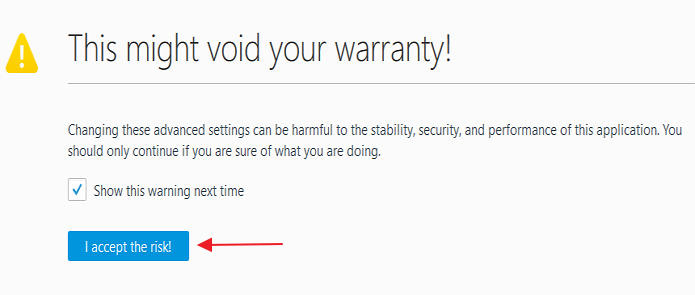
Accept the conditions mentioned below.
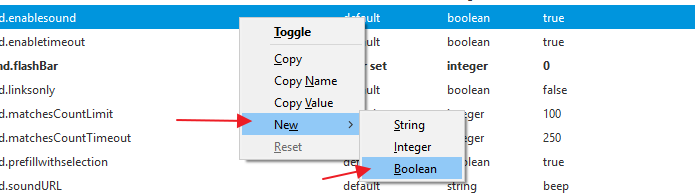
Next, right-click on a random spot on the page and choose the following.
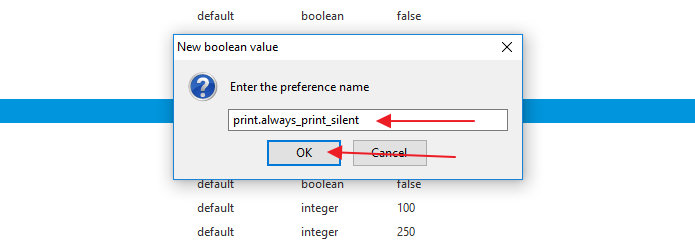
Write the following in the box: print.always_print_silent. Finally, press 'Ok'.
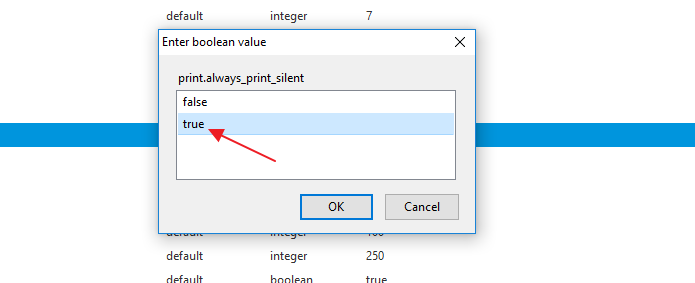
Finally, choose the value 'True'.
|